

Error codes and messages on Philips EP coffee machines
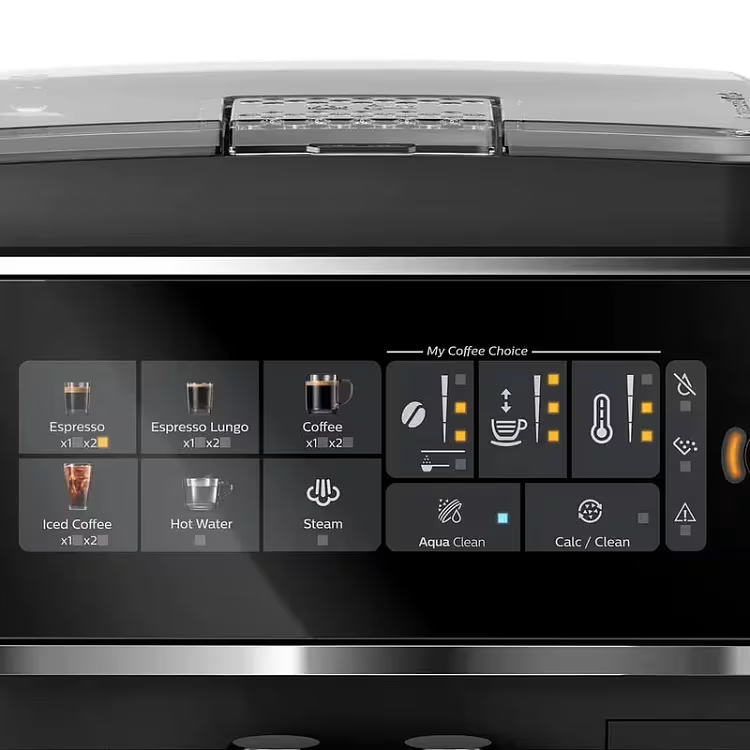
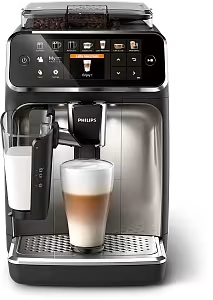
Philips EP series coffee machines communicate with the user through icons on the display or flashing LED lights. Models in the 3200, 4300 and 5400 series have a touch display with clear symbols, while the 2200 series (EP2220, EP2230, EP2235) uses a simpler panel with LEDs. AGD Group in Lodz specializes in diagnosing and repairing every Philips EP error.
Warning icons — 2200 series (EP2220, EP2230, EP2235)
The 2200 series has no text display — messages appear as flashing LED icons. Here are the most important:
- Water icon (drop) — the water tank is empty or not seated correctly. Remove the tank, fill it to the MAX mark, and put it back until you hear a click.
- Coffee icon (beans) — the bean hopper is empty. Add fresh beans. If the icon stays on even though the hopper is full, the problem is in the grinder or the sensor.
- Exclamation icon (⚠) — a general error. Switch the machine off, wait 30 seconds, and switch it on again. If the problem comes back, take the machine to a workshop.
- Brew group icon — the brew group is not seated correctly. Open the service door, remove the group, and put it back along the guides.
- Descaling icon (scale) — the machine needs descaling. Run the descaling procedure as described in the manual.
- All LEDs flashing quickly — a serious internal fault. A workshop repair is required.
Error codes — 3200, 4300 and 5400 series (touch display)
Models with a touch display (EP3240, EP3340, EP4340, EP5440, EP5540) show numeric codes or text descriptions. Here is the full list:
Error 1 — brew group error
Meaning: The brew group was not recognized, or it is in the wrong position.
Solution: Open the service door, remove the brew group, and check it for coffee grounds. Put it back along the guides until you feel a click. If the error returns, the brew group position microswitch is damaged.
Error 2 — brew group position error
Meaning: The group did not return to its starting position after the brew cycle.
Solution: Switch the machine off, wait 60 seconds, and switch it on again. If the group jams, it needs lubrication or a mechanism repair. Cost: from 120 PLN.
Error 3 — no water
Meaning: The machine does not detect water in the tank, or the pump cannot draw it in.
Solution: Fill the tank and seat it again. If the tank is full, the problem is in the tank valve or the pump. Repair cost: from 100 PLN.
Error 5 (05) — air in the water circuit
Meaning: There is air in the machine's water circuit (an air lock). The flow meter and the processor do not detect water flow through the system, so the machine stops — it cannot confirm that water is reaching the thermoblock.
Most common causes:
- Air got into the circuit after descaling — this is the most common case
- The water tank was empty for a long time, so the pump drew in air
- A new installation or first start-up — the water circuit was not bled
- A leaking seal at the tank or in the water circuit lets air in
Solution:
- Remove the water tank, fill it with fresh water to the MAX level, and seat it again until you hear a click
- If you use an AquaClean filter — take it out and soak it upside down in cold water until air bubbles stop coming out, then fit it back
- Run 2–3 hot water cycles (without coffee) — this flushes the circuit and removes the air
- Check the tank seals and the connectors in the water circuit — if they are worn, replace them
If the error still appears after the circuit is bled, the flow meter or the pump may be damaged — workshop diagnostics are required. Repair cost: from 120 PLN.
Error 6 — thermoblock error
Meaning: The thermoblock does not reach the required temperature within the set time.
Solution: The usual cause is scale (poorer heat transfer) or a damaged NTC thermistor. Descaling may help. If it does not, thermoblock repair: from 200 PLN.
Error 7 — grinder error
Meaning: The grinder is not grinding coffee, or it is blocked.
Solution: Check the hopper for foreign objects. Try adjusting the grind size. If the grinder hums but does not grind, the burrs are blocked. Repair: from 160 PLN.
Error 11 — internal communication error
Meaning: A communication problem between the electronic boards (the main board and the control board).
Solution: A reset does not help — the electronic board needs repair or replacement. Cost: from 350 PLN.
Error 12 — milk system error
Meaning: The LatteGo system failed to draw milk in, or the foam sensor is not working.
Solution: Check that the LatteGo container is assembled and seated correctly. Clean the nozzle. If the problem keeps coming back, the milk system valve may be damaged: from 150 PLN.
Error 15 — critical error
Meaning: A serious fault that needs a service visit. The machine locks and will not brew.
Solution: Do not try to repair it yourself — professional diagnostics are required. The workshop checks the main board, the motors, and the sensors. Repair cost: from 250 PLN.
Flashing icons — what do they mean?
- Flashing water icon — no water in the tank, or the tank is not seated correctly.
- Flashing coffee grounds container icon — empty the grounds container, then put it back (even if it is empty — it has to be removed and put back in).
- Flashing descaling icon — the machine urgently needs descaling. Ignoring it can damage the thermoblock.
- Steady key or tool icon — the machine needs a service inspection.
- Snowflake or temperature icon — the machine is heating up. Wait until the icon goes out.
How to reset a Philips EP coffee machine?
Many errors can be fixed with a reset. The procedure depends on the model:
Soft reset (all models)
- Switch the machine off with the power button.
- Unplug the power cord from the outlet.
- Wait 5 minutes.
- Plug it back in and switch it on.
Factory reset — 2200 series
- Switch the machine off.
- Hold the espresso button and the coffee with milk button at the same time.
- Switch the machine on while still holding the buttons.
- Release them after 3 seconds — the machine goes into setup mode.
Factory reset — 3200/4300/5400 series
- Open the settings menu (gear icon).
- Scroll to "Factory settings" / "Factory reset".
- Confirm the reset.
When to take the machine to a workshop?
Contact the workshop when:
- The error still appears after a restart and a factory reset.
- You see codes Error 5, 11 or 15 — these are electronic faults.
- All the LEDs flash at the same time — this means a serious fault.
- The machine will not turn on at all, or it switches off after a few seconds.
At AGD Group, diagnostics cost 70 PLN, and we include that fee in the repair price. We arrange courier shipping across Poland — collection and return are free.
Cennik i specyfikacja usług
Podstawowe parametry usługi
| Czas trwania | 3-7 dni w zależności od kolejki |
| Gwarancja | 3 Mies. |
Dodatkowe informacje
Wszystkie usługi serwisowe wykonywane są przez wykwalifikowanych techników z wieloletnim doświadczeniem.
Popularne usterki — naprawa w Łodzi
Najczęściej zgłaszane awarie ekspresów do kawy w serwisie AGD Group. Sprawdzenie od 70 PLN, naprawa zwykle 2–3 dni robocze.
Serwis Philips w Łodzi
Naprawa ekspresów Philips w niezależnym serwisie pogwarancyjnym AGD Group w Łodzi. Oryginalne części, diagnostyka od 70 PLN, realizacja zwykle 2–3 dni robocze.
AGD Group to niezależny serwis pogwarancyjny — nie jesteśmy autoryzowanym centrum serwisowym producenta.
- Adres
- aleja Włókniarzy 234A, 90-556 Łódź
- Telefon
- +48 459 568 444
- Godziny
- Pn–Pt 9:00–19:00 (sob.–niedz. zamknięte)
- info@agdgroup.pl