

Display types in Nivona coffee machines
Nivona uses different display technologies depending on the CafeRomatica series. It helps to know which panel is in your machine — that makes diagnosis and any later repair easier:
- LED with icons (5xx series) — the simplest models, such as the CafeRomatica 520 and 530, have a panel with LEDs and graphic symbols. Faults usually affect the membrane buttons and individual LEDs.
- Text LCD (6xx/7xx series) — the CafeRomatica 670, 680 and 756 have a monochrome LCD with a text menu. Typical problems are loss of contrast, dead pixels and a damaged flex cable.
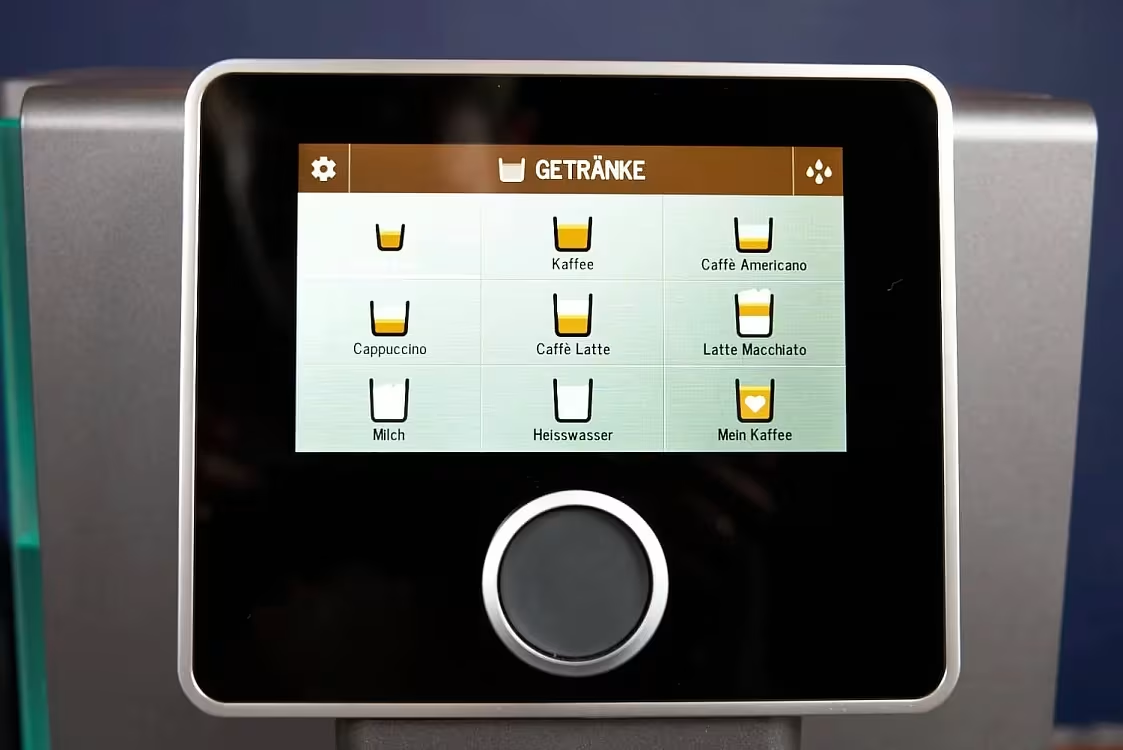
- Color TFT (8xx/9xx/10xx series) — flagship models, the CafeRomatica 820, 960 and 1030, have color TFT displays with a touch interface or a rotary knob. Faults include no backlight, artifacts on the screen and no response to touch.
Whatever the display type, a failed screen always makes the machine hard to use, or impossible to use at all. Without a working control panel you cannot choose a drink, change the settings or read service messages.
Symptoms of a Nivona display fault
These signs point to a problem with the display or the control panel:
- Screen completely dark — no backlight even though the machine is switched on
- The display flickers or goes blank at random while the machine is running
- Stripes, graphic artifacts or unreadable characters on the screen
- The touch panel does not respond to touch, or it responds with a delay
- Physical controls (rotary knob, membrane panel) do not respond when pressed
- The machine switches on, but the display shows only a white or colored background with no content
- The display shows a message in a foreign language and the settings cannot be changed
- Loss of contrast — the text on the LCD is barely visible
Causes of Nivona display damage
Displays in coffee machines work in harsh conditions. Heat, moisture and steam are the main threats to their reliability. The most common causes of failure:
- Flooded by steam — steam from the thermoblock gets inside the machine and condenses on the display board. Moisture corrodes the contacts and damages the electronic circuits.
- Damaged flex cable — the flexible ribbon that connects the display to the main board breaks, especially at the bend. This is a common problem after the machine has been transported.
- Power surges — voltage spikes on the mains can damage the display controller. The machine still runs, but the screen shows no image.
- Mechanical wear of the buttons — the rotary knob (jog dial) on 6xx-10xx models loses contact after years of use. Membrane buttons on the 5xx series lose their spring.
- Aging LED backlight — older models with a CCFL backlight or early LEDs can lose brightness after 5-7 years.
How to reset a Nivona coffee machine
Before you book a service visit, try a factory reset. Sometimes a display problem comes from a software fault, not a hardware failure:
- Switch the machine off with the power button
- Unplug it from the socket and wait at least 60 seconds
- Plug it back in and switch the machine on
- If the problem is still there — open the menu Settings → Restore factory settings (available on models with an LCD or TFT)
- On models with an LED panel (5xx): hold the small coffee and large coffee buttons together for 10 seconds while the machine is starting
If the reset does not help, the fault is in the hardware. That calls for a professional repair.
Nivona models most often affected by display faults
From our workshop records, these are the models whose displays we repair most often:
- Nivona CafeRomatica 670 / 680 — LCD flex cable fault, loss of contrast
- Nivona CafeRomatica 756 / 758 — corrosion of the LCD contacts after contact with steam
- Nivona CafeRomatica 820 / 825 — TFT panel faults, no response from the rotary knob
- Nivona CafeRomatica 960 — damaged TFT display controller
- Nivona CafeRomatica 1030 — touchscreen problems after the panel was flooded by steam
How we repair a Nivona display at AGD Group
Repairing the control panel and the display takes precise electronic diagnosis:
- Diagnosis — we test the display power supply, communication with the main board, flex cable continuity and the condition of the controller.
- Finding the faulty part — we establish whether the fault is in the display itself, the flex cable, the controller or the machine main board.
- Repair or replacement — depending on the diagnosis: we resolder damaged traces, replace the flex cable, replace the display controller or replace the whole panel module.
- Cleaning and protection — we clean corrosion deposits off the board and apply a conformal coating to protect it from moisture later on.
- Test — we check full function: that the display is readable, that it responds to touch or the rotary knob, and that every menu message is correct.
Cost of Nivona display repair
Approximate prices for display and control panel repairs on Nivona coffee machines:
| Service | Price from |
|---|---|
| Coffee machine diagnosis | 70 PLN |
| Flex cable repair / resoldering | from 150 PLN |
| LCD display replacement | from 250 PLN |
| TFT panel with rotary knob replacement | from 350 PLN |
| Controller board repair | from 200 PLN |
| Membrane button replacement | from 120 PLN |
Diagnosis (70 PLN) is included in the repair price. We confirm the exact quote after inspection. Call: 459 568 444.
How to look after a Nivona display
A few simple habits that help you avoid control panel faults:
- Do not place the machine directly under a kitchen cabinet — steam leaving the top of the unit condenses and runs inside, flooding the electronics.
- Clean the panel with a soft, slightly damp cloth — do not use harsh detergents, and do not spray liquid straight onto the panel.
- Plug the machine into a surge-protected power strip — this protects the electronics from voltage spikes.
- Do not touch the display with wet fingers — moisture can get in through gaps in the screen housing.
- Clean the drip tray and the brew unit chamber regularly — extra moisture inside the machine raises the risk of corrosion on electronic parts.
If the display is not working properly, contact us. Fixing it early often costs less.
Cennik i specyfikacja usług
Podstawowe parametry usługi
| Czas trwania | 3-7 dni w zależności od kolejki |
| Gwarancja | 3 Mies. |
Dodatkowe informacje
Wszystkie usługi serwisowe wykonywane są przez wykwalifikowanych techników z wieloletnim doświadczeniem.
Popularne usterki — naprawa w Łodzi
Najczęściej zgłaszane awarie ekspresów do kawy w serwisie AGD Group. Sprawdzenie od 70 PLN, naprawa zwykle 2–3 dni robocze.
Nivona service in Łódź
Nivona coffee machine repair at the independent after-warranty workshop AGD Group in Łódź. Genuine parts, diagnostics from €16, usually completed in 2–3 business days.
AGD Group is an independent after-warranty service — we are not an authorised manufacturer service centre.
- Address
- aleja Włókniarzy 234A, 90-556 Łódź
- Phone
- +48 459 568 444
- Hours
- Mon–Fri 9:00–19:00 (Sat–Sun closed)
- info@agdgroup.pl