


Melitta error codes — full list with descriptions and fixes
Melitta automatic coffee machines have a built-in self-diagnosis system that warns you of problems with error codes on the display. Once you know what a message means, you can judge the fault quickly and decide whether to try a repair yourself or call a workshop.
Below is the full list of error codes for Melitta Caffeo Solo (E950), Caffeo CI (E970), Barista TS Smart (F85), Barista T Smart (F83), Purista (F230), Avanza (F270) and LatteSelect (F630).
Melitta error code table
| Error code | Problem description | Models affected |
|---|---|---|
| Error 1 | Brewing unit problem — the brew unit does not reach its working position | All models |
| Error 2 | Grinder fault — the motor does not turn, or ground coffee is not detected | All models |
| Error 3 | Water dosing problem — the pump does not build the required pressure | All models |
| Error 5 | Heating / thermoblock fault — the water does not reach the required temperature | All models |
| Error 6 | Temperature sensor fault — incorrect water temperature reading | All models |
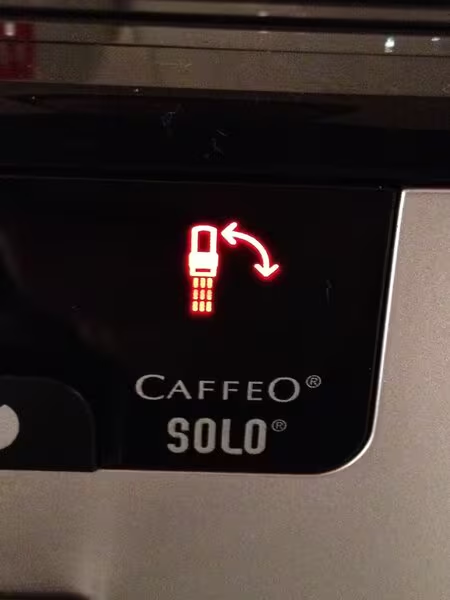
| Error 8 | Brewing unit positioning problem — the most common error code on Melitta machines | All models |
| Error 13 | General system error — an internal electronics fault | Barista TS/T, LatteSelect |
| Error 14 | Bean selector / grinder lock | Barista TS/T, CI, LatteSelect |
Error 1 — brewing unit problem
Error 1 appears when the brewing unit is not working correctly. The machine cannot start brewing because the brew unit is not in the right position.
Causes:
- Worn mechanical drive of the brewing unit (gearbox, gears)
- A jammed mechanism — a foreign object or old coffee grounds
- Moving parts that have not been lubricated
What to do: Switch the machine off, wait 30 seconds, then switch it on again. If the error returns, the machine needs a workshop. Repair cost: from 100 PLN (cleaning) to 280 PLN (brewing unit replacement).
Error 2 — grinder fault
Error 2 is a coffee grinder problem. The machine detects that the grinder is not working correctly — it is not grinding the beans, or it is grinding at the wrong speed.
Causes:
- A foreign object in the grinder (a small stone, an under-roasted bean)
- Worn burrs (steel or ceramic)
- A damaged grinder motor
- An empty bean hopper
What to do: Check that there are beans in the hopper. Switch the machine off and look into the grinder chute — remove any foreign objects. If the problem remains, take the machine to a workshop. Repair: from 160 PLN (burr replacement) to 280 PLN (grinder replacement).
Error 3 — water dosing problem
Error 3 means a hydraulic fault. The pump does not build the required pressure, or water is not flowing correctly through the system.
Causes:
- A scaled thermoblock or valves
- A damaged pressure pump (ULKA/CEME)
- A leak in the hydraulic circuit
- An empty water tank, or a tank that is not seated correctly
What to do: Make sure the water tank is full and fitted correctly. Run the descaling program. If that does not help, the machine needs diagnostics. Cost: from 120 PLN (descaling) to 250 PLN (pump replacement).
Error 5 — heating / thermoblock fault
Error 5 points to a problem in the heating system. The machine cannot heat the water to the required brewing temperature (90-96 degrees Celsius).
Causes:
- A scaled thermoblock — limescale acts as an insulator and blocks heat transfer
- A burnt-out thermoblock heater
- Damaged electrical circuits that power the heater
What to do: Run the descaling program. If the error stays, you need a workshop. Repair cost: from 120 PLN (professional descaling) to 300 PLN (thermoblock replacement).
Error 6 — temperature sensor fault
Error 6 means an incorrect reading from the temperature sensor (NTC). The machine electronics cannot determine the current water temperature, so the machine cannot operate safely.
Causes:
- A damaged NTC sensor (short circuit or open circuit)
- A disconnected sensor wire
- Corrosion on the electrical contacts
What to do: This fault has to be repaired in a workshop — it cannot be cleared at home. Cost: from 100 PLN (sensor replacement) to 180 PLN (circuit repair).
Error 8 — brewing unit positioning problem (the most common)
The Error 8 message on Melitta machines means the brewing unit has not found the correct position. The drive motor met too much resistance, or the encoder did not confirm where the brew unit is. This is not a simply jammed part — the fault is in the drive mechanism itself.
Causes:
- The brewing unit is fitted incorrectly — it did not click fully into place, so the drive cannot work
- Worn drive gears — the plastic gears wear down over years of use
- A damaged encoder or position sensor — the electronics do not know where the brew unit is
- A build-up of grounds and old oils — this restricts movement of the brew unit
- Dried grease on the guides — resistance rises and the motor draws more current
Fix: Remove the brewing unit and wash it thoroughly under water. Lubricate the guides with food-grade silicone. Fit the brew unit back and make sure it clicks properly into place. If Error 8 returns, the machine needs workshop diagnostics of the drive, gearbox and encoder. Cost: from 120 PLN (cleaning and lubrication) to 280 PLN (motor or gearbox replacement).
Error 13 — general system error
Error 13 reports an internal problem in the control electronics. It usually appears on newer Melitta models with an electronic display.
Causes:
- A software fault
- A problem with internal sensors
- Control board damage from a power surge
What to do: Start with a factory reset (instructions below). If that does not work, the machine needs a workshop. Cost: from 150 PLN (diagnostics and reset) to 400 PLN (electronics board replacement).
Error 14 — bean selector / grinder lock
The Error 14 message on Melitta machines means a problem with the bean selector or the grinder — not the electronics board. The selector (the switch between coffee hoppers) is locked, or the grinder has met a mechanical obstruction.
Causes:
- A bean wedged in the selector — a single bean has blocked the mechanism that switches between coffee hoppers (on two-hopper models: Barista TS, CI, LatteSelect)
- Incorrect selector setting — the selector slider is not in the correct position
- A blocked grinder — a foreign object (a stone, a piece of packaging) has stopped the burrs
- Grind set too fine — the burrs meet too much resistance at a very fine setting with oily beans
Fix: Check the bean selector — move it several times in both directions. Remove the bean hopper and look for a foreign object in the grinder throat. Set the grind two positions coarser (only while the grinder is running). If Error 14 does not clear, the selector and grinder need workshop diagnostics. Cost: from 80 PLN (clearing the blockage) to 200 PLN (selector or burr replacement).
The "Fill system" message
This is not an error code. It tells you that the hydraulic circuit needs bleeding. It appears after a long period without use, after the water tank is replaced, or after descaling.
Fix:
- Fill the tank with fresh, cold water
- Press the steam or hot water button
- Wait until water starts coming out of the spout — the system then bleeds itself
- The message should disappear after a few seconds
If the message stays even with a full tank, the pump or a valve may be at fault. Workshop diagnostics are then needed.
The "Bohnen einfüllen" message (Add beans)
The message "Bohnen einfüllen" (or "Add beans") appears when the sensor in the coffee hopper does not detect beans. It can mean:
- An empty hopper — add coffee beans
- Beans that are too oily — they stick to the walls and do not fall into the grinder. Stir them with a spoon.
- A damaged sensor — if the message appears even with a full hopper, the sensor needs replacing (from 80 PLN)
How to factory-reset a Melitta coffee machine
A factory reset restores the default settings and can help with some software problems. The steps depend on the model:
Caffeo Solo (E950) / Purista (F230):
- Switch the machine off with the power button
- Hold the "1 cup" and "2 cups" buttons at the same time
- While holding the buttons, switch the machine on with the power button
- Release the buttons when the LEDs start flashing
- The machine runs a rinse cycle and restores the factory settings
Caffeo CI (E970) / Barista TS Smart (F85) / LatteSelect (F630):
- Open the settings menu on the display
- Go to "Settings" → "Factory settings"
- Confirm the reset
- The machine restarts with the default settings
Note: A factory reset clears all saved drink profiles and user settings. It will not fix mechanical or electrical faults — it only helps with software problems.
Repair cost by error code — guide prices
- Error 1 (brewing unit) — from 100 PLN (cleaning) to 280 PLN (replacement)
- Error 2 (grinder) — from 160 PLN (burrs) to 280 PLN (complete grinder)
- Error 3 (water) — from 120 PLN (descaling) to 250 PLN (pump)
- Error 5 (heating) — from 120 PLN to 300 PLN (thermoblock)
- Error 6 (sensor) — from 100 PLN to 180 PLN
- Error 8 (jammed brewing unit) — from 100 PLN to 280 PLN
- Error 13 (system) — from 150 PLN to 400 PLN
- Error 14 (electronics) — from 200 PLN to 400 PLN
Diagnostics: 70 PLN (a fixed fee, included in the repair cost). Courier shipping: from 20 PLN (one way) or from 40 PLN (both ways).
When to take a Melitta machine to a workshop
Not every error code means you should take the machine to a workshop straight away. A simple rule:
- Try it yourself: "Fill system", "Bohnen einfüllen", a one-off Error 8 (a restart usually helps)
- Take it to a workshop: Error 8 that keeps coming back, Error 1/2/5/6/13/14, any fault that returns after a restart
At AGD Group in Lodz we repair every Melitta model. We serve customers across Poland and offer convenient courier shipping. Call: 459 568 444.
Service pricing and specification
Basic service parameters
| Czas trwania | 3-7 dni w zależności od kolejki |
| Gwarancja | 3 Mies. |
Additional information
All service work is performed by qualified technicians with years of experience.
Common faults — repair in Łódź
Most reported coffee machine failures at AGD Group. Inspection from 70 PLN, repair usually 2–3 business days.
Melitta service in Łódź
Melitta coffee machine repair at the independent after-warranty workshop AGD Group in Łódź. Genuine parts, diagnostics from 70 PLN, usually completed in 2–3 business days.
AGD Group is an independent after-warranty service — we are not an authorised manufacturer service centre.
- Address
- aleja Włókniarzy 234A, 90-556 Łódź
- Phone
- +48 459 568 444
- Hours
- Mon–Fri 9:00–19:00 (Sat–Sun closed)
- info@agdgroup.pl