


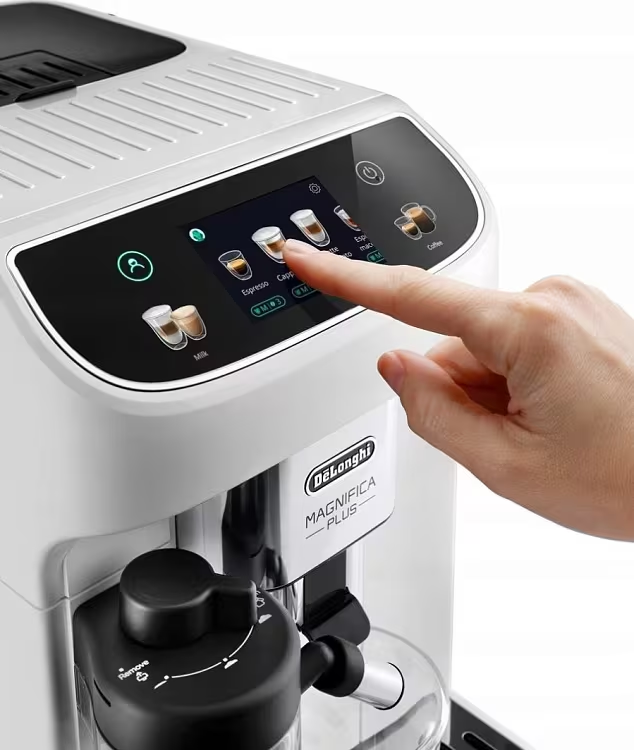
DeLonghi coffee machine display repair
Modern DeLonghi coffee machines use different screens — from simple LED icon panels on the entry-level Magnifica S to color TFT touchscreens in the Dinamica and PrimaDonna series. When the display or the control panel fails, the machine becomes hard to use, or impossible to use at all. At AGD Group in Lodz we repair DeLonghi coffee machine electronics, including displays and touch panels. We are one of the few services in Poland to carry out component-level (SMD) repairs.
Display types in DeLonghi coffee machines
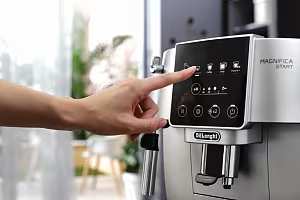
- LED icon panel — Magnifica S (ECAM 22.110), Magnifica Start — backlit buttons and indicator LEDs. This is the simplest design, and it rarely fails.
- Segment LCD — older ESAM models (3000, 4000, 6600) — shows text messages. The most common fault is a missing backlight.
- Color TFT touchscreen — Magnifica Evo (ECAM 292.81), Dinamica (ECAM 370/380) — a 2.8-inch screen with a graphic menu and touch control.
- Premium TFT display — PrimaDonna Elite/Soul, Eletta Explore — a large 3.5–4.3-inch screen with animations, user profiles and drink personalization.
Symptoms of a DeLonghi display fault
The symptoms customers report most often, and that show up in our service data:
- The display does not light up — complete darkness even though the machine is switched on. The machine may still run “in the dark” (it responds to the buttons and brews coffee, but nothing is visible).
- No LCD backlight — the segment display is active but not lit. The content is visible only at an angle, or with a flashlight.
- Flashing or flickering backlight — the backlight LEDs lose stability and the screen flickers.
- Artifacts on the screen — stripes (horizontal or vertical), white or black pixels, distorted colors, random patterns.
- Touch does not respond — the screen shows an image but does not react to touch (or it reacts in the wrong place — “ghost touch”).
- The display goes dark during use — the screen works for a moment after switch-on, then goes blank. This is a power or thermal fault.
- The screen responds late or freezes — a processor or memory problem on the main board.
- Physical buttons do not work — no backlight and no response when pressed. The control panel is damaged.
Causes of display damage
- Water or steam ingress — the most common cause (~40% of cases). Steam from the thermoblock condenses inside the housing and reaches the display electronics, corroding the connections and causing short circuits. Machines placed under kitchen cabinets are especially affected.
- Damaged flex cable — a delicate flat ribbon that connects the display to the main board. It cracks at the bends or loses contact at the connectors. This most often happens when the housing is opened repeatedly.
- Power surges — a voltage spike on the mains damages the display driver (LCD/TFT driver) or the backlight converter. It can follow a storm, a mains fault, or switching on a high-power appliance on the same circuit.
- Digitizer wear — the touch layer (capacitive touch) loses sensitivity after 5–7 years of heavy use. The result is a delayed response, dead zones and ghost touch.
- LED backlight failure — the backlight diodes burn out or lose brightness. The screen still shows an image, but it is very dark.
- Microcontroller failure — the control chip on the main board does not generate a video signal for the display. This is a board-level fault, not a fault of the screen itself.
How we repair DeLonghi displays at AGD Group
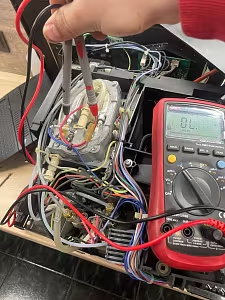
- Diagnosis — we identify whether the fault is in the display itself, the flex cable, the main board or the power supply. We connect a test display to confirm whether the screen or the electronics are at fault.
- Flex cable repair — resoldering the micro-connections, or replacing the entire flex cable.
- Display replacement — fitting a new LCD/TFT panel and calibrating brightness, contrast and touch.
- Control board repair — replacing damaged SMD components under a microscope: the display driver, the backlight converter, capacitors and resistors.
- Cleaning and drying after liquid damage — disassembly, ultrasonic cleaning in isopropyl alcohol, drying, and a coat of protective lacquer.
- Firmware update — a display firmware update can sometimes clear artifacts or a screen that freezes.
- Final test — we check every function, test touch in different areas of the screen, and test the backlight at several brightness levels.
What does a red light on a DeLonghi coffee machine mean?
A red light or a flashing LED on the control panel can mean different things depending on the model:
- Steady red next to the water symbol — no water in the tank, or the tank is not seated correctly.
- Flashing red next to the descaling symbol — descaling is required.
- Flashing red next to the grounds symbol — the grounds container is full.
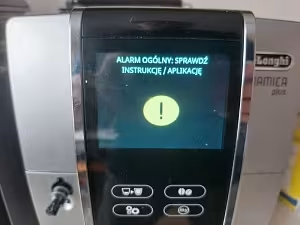
- All lights flashing at once — General Alarm — a serious fault that needs a service visit.
- Flashing orange/yellow — the machine is heating up (normal after switch-on).
DeLonghi display repair cost
- Diagnosis — 70 PLN (included in the repair price if you proceed).
- Flex cable / flex connection repair — from 120 PLN.
- Segment LCD replacement — from 180 PLN.
- Touch TFT panel replacement — from 250 PLN.
- Control board repair (SMD) — from 300 PLN.
- Liquid-damage repair (ultrasonic cleaning and drying) — from 200 PLN.
- Backlight converter replacement — from 150 PLN.
You receive an exact quote after diagnosis. We do not start the repair without your approval. Repair warranty: up to 12 months.
Prevention — how to protect the coffee machine display
- Do not place the machine under kitchen cabinets — steam and condensation from boiling water are the main threat to the electronics. Leave at least 15 cm of free space above the machine.
- Clean the control panel with a dry, soft cloth — never use water, detergents or alcohol on the touchscreen.
- Plug the machine into a surge-protected power strip — this protection costs 30–50 PLN and can save electronics worth 300+ PLN.
- Do not flood the top of the machine while cleaning — water from above runs straight onto the electronics.
- Act on the first symptoms — a flickering backlight or a slow touch response is an early warning sign. A repair at an early stage costs much less.
Cennik i specyfikacja usług
Podstawowe parametry usługi
| Czas trwania | 3-7 dni w zależności od kolejki |
| Gwarancja | 3 Mies. |
Dodatkowe informacje
Wszystkie usługi serwisowe wykonywane są przez wykwalifikowanych techników z wieloletnim doświadczeniem.
Popularne usterki — naprawa w Łodzi
Najczęściej zgłaszane awarie ekspresów do kawy w serwisie AGD Group. Sprawdzenie od 70 PLN, naprawa zwykle 2–3 dni robocze.
DeLonghi service in Łódź
DeLonghi coffee machine repair at the independent after-warranty workshop AGD Group in Łódź. Genuine parts, diagnostics from €16, usually completed in 2–3 business days.
AGD Group is an independent after-warranty service — we are not an authorised manufacturer service centre.
- Address
- aleja Włókniarzy 234A, 90-556 Łódź
- Phone
- +48 459 568 444
- Hours
- Mon–Fri 9:00–19:00 (Sat–Sun closed)
- info@agdgroup.pl